
What's on the tuner screen
For Braw Bagpipe Tuner 3 · Updated 23 November 2026
The tuner screen has a main gauge at the top, which shows the note you are playing, and average bars below it for each chanter note and both drones. The picture shows each part, numbered, with what it does listed below it.
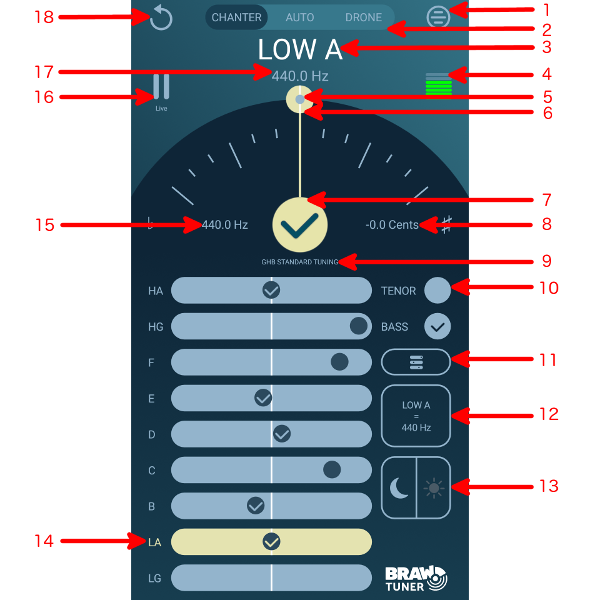
- The menu.
- The tuner mode button: CHANTER, AUTO or DRONE (on iPhone and iPad, DRONES). It selects what the display focuses on (the chanter notes, the drones, or both) and adjusts the bar layout to match.
- The name of the note you are playing (or, if the gauge is locked to a note, the name of the locked note).
- The volume gauge. It shows the volume of the voice currently on the main gauge (chanter, tenor or bass). Tap it to set a cut-off volume below which the tuner will not respond. Touch and hold it to recalibrate it.
- The small blue circle shows the instantaneous frequency of the note you are playing. Straight up is in tune, to the left is flat and to the right is sharp.
- The larger yellow indicator, with a dark arrow at its centre, shows the averaged frequency of the note you are playing. The arrow points to the precise reading; the width of the yellow halo around it shows how stable the note is (wide is unstable, more circular is stable).
- The in-tune indicator shows a tick when the average frequency of the note you are playing is within a few cents of being in tune, and red otherwise.
- How sharp or flat the note you are playing is, in cents (negative numbers are flat, positive are sharp).
- The chanter tuning scheme in use.
- An average bar in compressed form. The display shown is in chanter mode, so the drones' average bars are condensed.
- The TUNING SCHEME button, to choose a chanter tuning scheme.
- The LOW A button, to calibrate your Low A. Probably the most important button on the screen!
- The theme button.
- An average bar in full form. A circle to the left of the white line is flat, and to the right is sharp. See How the rolling averages work.
- The frequency in Hertz of the note you are playing.
- The pause button freezes the tuner: it doesn't update until you tap the button again.
- The reference frequency for the note you are playing. When you play Low A, this is the result of your calibration; for the other notes, it is adjusted to match.
- Tap to reset the averages.
Still stuck? Contact us and we’ll help you out.