
Using an external microphone
Braw Bagpipe Tuner 3 · iPhone, iPad and Android · Updated 23 November 2026
You don't need a separate microphone: the tuner works well with the built-in microphone on your device, which on modern phones and tablets is of high quality. An external microphone can be useful, though, especially in noisy places where the tuner might not be able to pick out your pipes from other sounds.
In general, when you attach a compatible external microphone to your device, it becomes the default microphone, and the tuner switches to it automatically. This is standard behaviour on Apple and Android devices, not something the tuner does.
While we don't provide direct support for troubleshooting external microphones, and cannot guarantee that any particular combination of microphone, device and operating system version will work, here are some general guidelines which we hope you will find useful.
Recommended for noisy places: the InTuneMic
The InTuneMic is a wireless clip-on instrument microphone for smartphones, designed specifically for use with the pipes. It is sold and supported by Jori Chisholm at bagpipelessons.com.
In our tests the InTuneMic performed very well, and we are happy to recommend it as our external microphone of choice for the Braw Bagpipe Tuner. It comes into its own where the built-in microphone has the hardest job:
- Pipe band tuning: when several pipers are playing at once, clipping the InTuneMic close to the drone or chanter you are tuning gives the cleanest possible signal and the most accurate readings.
- Outdoor and noisy places: placing the microphone close cuts through the wind, traffic and other noise that can interfere with the built-in microphone.
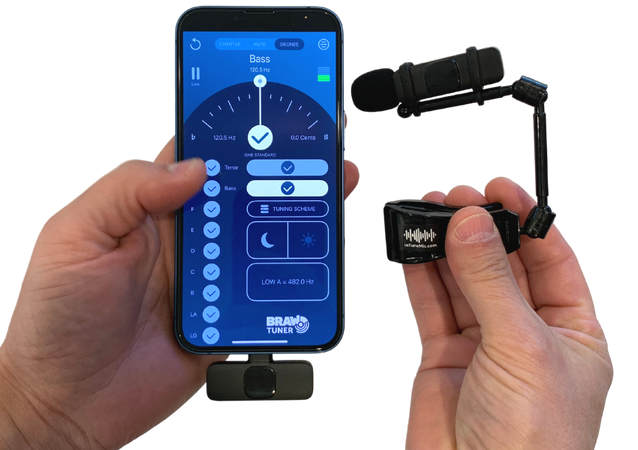
Jori Chisholm demonstrates using the Braw Bagpipe Tuner with the InTuneMic to tune your chanter and drones. It is an excellent and thorough video, with some useful general tips, and well worth a watch even if you don't have the InTuneMic.
Recorded before version 3
This video predates version 3 of the Braw Bagpipe Tuner, so it doesn't show the newer way of tuning your drones (the tuner on a table in front of you, tapping a drone's bar to focus on it). It is still well worth watching for its general tuning tips.
Bluetooth microphones
Bluetooth microphones should generally work as long as they appear as the default microphone on your device. Be aware, though, that noise filtering, automatic volume adjustment or other audio processing may interfere with the sound the tuner receives. It is best to turn these features off when using a tuning app.
Clip-on microphones that pick up vibration
Some clip-on microphones work partly by picking up the sound through close contact and vibration. Some users report success with these.
Microphones with a 3.5mm jack
In general you can use an external microphone through the 3.5mm headphone port on your device (or through the Lightning port on more recent Apple devices). No further setting up is needed: just plug it in and play.
The microphone's jack must be compatible with your device. For Apple devices and the vast majority of Android devices, this means the jack must have 3 black rings on it, rather than just 2. In the picture below the right-hand jack is the compatible one; the left-hand jack will typically not work.
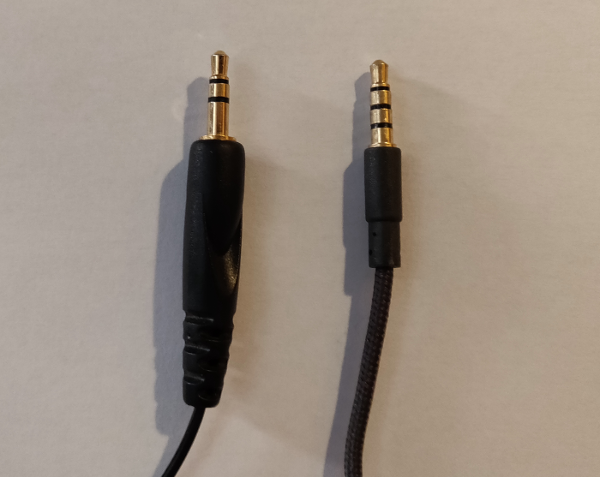
If you have a microphone with a 2-ring jack that you want to use (like the left-hand example above), you can use an adapter. A couple of examples on Amazon:


Still stuck? Contact us and we’ll help you out.